Here’s a thing I’ve noticed with LLMs. You start off the session asking a perfectly reasonable question, say, about
models for open source software projects. The LLM gives its response, and at the end: “if you give me a specific
category of software, I can list more options and …”. You reply “CRMs.” Another answer, then:
“If you tell me your exact use case (self hosting, reuse for clients, …), I can break down the licensing and …”
“self-hosting”
“If you want, I can map the landscape … and give 5-10 companies into each quadrant.”
“Sure.”
“(answer with charts) if you’re interested, I can add a third axis …”
“OK.”
Soon enough you’re just replying “Sure.” “Go on.” “Nah, option B.” “Continue.” The mental equivalent of scrolling
Tiktok, except with ChatGPT, or Claude, or Gemini. I’m not sure there is a word for this yet — I was tempted to say
“doomprompting” but you’re not exactly filled with dread here. If anything, it’s the opposite. Look at all the
generated tokens! I’m super productive and just monitoring the situation with my little LLM helpers. There might not
be a feeling of doom, but it echoes the semi-zombie state of social media. You start with coherent thoughts and
critical analysis then slowly collapse into (swipe right) / (swipe left).
“Promptbaiting” is the closest term I can think of. I’m sure at least part of it is from the models’ training to be
helpful, but doesn’t it almost feel like they’re baiting you into continuing the conversation? You won’t BELIEVE the
knowledge that’ll come out next turn!
Recently I joined the cool kids in using Claude Code / Codex + a bag-of-md’s as a sort of research assistant / second
brain notes repo. So far they’ve been self-isolated smaller repos but the most interesting one is probably company
research. tl;dr - I now have a completely vibe-coded bag of skills + python scripts that do things like download + cache
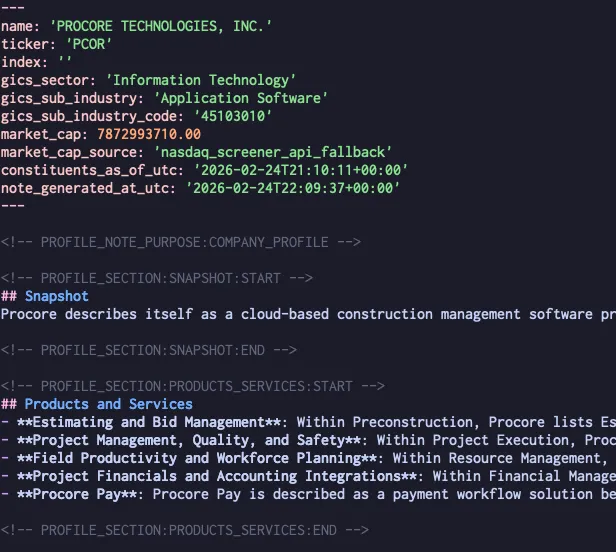
sec docs, trustpilot reviews, etc. One of the workflows is if I see a company I’m curious about, I can just go “do me a
full writeup on procore” and get something that looks like this as a starter:
… Which I can then work on as I decide to dig in further / not. This report + saved materials can also be used for quick
Q&A and stress testing ideas (“XYZ startup claims to (fancy ai doc thing) for construction, who are the incumbents + are
they already trying to do this …”). There are also some gardening skills just around keeping things clean + formatted +
consistent across different files.
I’ve been thinking about slapping some nicer md rendering + maybe editing around this — unlike the cool kids, I am not a
huge fan of Obsidian these days.
Also wonder if it would be useful to have a second brain tool that is more purpose-built + works out of the box,
especially for the other 95% of the internet that is not going to use Claude Code. (Or maybe everyone will eventually
use Claude Code! Non-technical people seem willing enough to yolo-roll OpenClaw.)
So I vibe-coded a photo site, in the truest sense of the term: aside from a few
naming edits and obviously the album + copy itself, I wrote exactly 0% of the code by hand. Some of the code, I barely
even read. In all, the LLM wrote:
The website itself, which is a static website driven by astro. The output is entirely
vanilla: plain HTML, css, js.
CDK code for the hosting infrastructure, S3 + Cloudfront.
Utility scripts, mostly python, for workflow: collating image names, working exif data, bulk upload, etc.
How did it go?
This is the exact type of “nice to have” project that would have been too much of a pain to do without LLMs. Most of
the vibing happened in the in-between times: waiting for claude to crunch on harder problems, in between cooking dinner,
etc. As a testament to the progress of LLMs, I vaguely recall attempting something like this back in 2024 and the
results were not nearly good enough to publish. (Right, yes, I could have gotten it there, but again, too much of a
pain.) This time, prompting more or less Just Worked on both the astro site as well as the more finicky CDK code.
Does this mean the AI is coming for our jobs? At time of writing in early 2026, I’d still lean no. Despite prompting
“just working,” it was heavily helped by my ~two decades of experience writing software. I had to steer it a lot: from
little things like “include a requirements.txt for python and update .tool-versions” to big things like “dropping to
L1 CDK constructs seems really dumb here, are you sure this is the issue.”
… Then there’s the obvious fact that this is a photo site. I would absolutely not take this approach to production
code, and barring some extinction-level jumps in model intelligence, I’m not sure I’ll ever get there. So can we count
this photo site as “productivity gainz”? Technically, sure, I guess? But when pundits reference the 10x+ productivity
jump, they usually mean serious software with economic value.
The Great Deployment Filter
The biggest friction point, and where technical experience really comes into play, is in the deployment. Vibing a
S3+Cloudfront setup only works because I’m masochistic enough to already have a personal AWS account managed via CDK,
and know CDK well enough to see that Claude is not doing something completely deranged. I recognize that running your
own AWS is… slightly unusual, even for developer-y types. In contrast, a non-technical person would have had to
figure out, from scratch, hosting for photo assets and deployment for the site itself. We quickly go from “speak
english to claude” to “here’s a list of clouds,
glhfdd” And this is just for a static html website — no
external APIs, OAuth integrations, etc making life even harder.
Insofar as we want LLMs to lower the barrier to entry for shipping software, deployment and runtime is still one of the
biggest constraints right now.
Let’s say you’ve got some code in ~/projects/awesome_ai_bot that needs an OPENAI_API_KEY environment variable.
You save your openai key into your 1Pass local_apps vault with the name openai_api_key, which you can access with:
op item get openai_api_key --vault local_apps --fields credential --reveal
Then, in ~/projects/awesome_ai_bot/.envrc:
export OPENAI_API_KEY=`op item get openai_api_key --vault local_apps --fields credential --reveal`
When you cd ~/projects/awesome_ai_bot, direnv runs the file, 1Pass prompts once to decrypt, and Bob’s your uncle:
Access follows 1Password semantics. You confirm once and everything is unlocked for your session. If it’s been more
than 10 minutes, or your 1Pass gets locked, etc, it will re-prompt.
The 1Pass prompt makes it less likely to get your secrets stolen in the background by, say, an npm post-install
script.
Access is per shell and direnv loads/unloads based on cwd so secrets are not hanging around.
.envrc is safe to commit, assuming you have that privilege. If not, just put it upstream. This is super handy for
client work, where I will have ~/projects/client_1/.envrc which then gets applied to ~/projects/client_1/backend,
~/projects/client_1/frontend, etc. I get the safety of this setup without necessarily imposing 1Pass + direnv into
their processes.
even more secure-er secrets
If you have full control over the project, it’s even better to skip direnv and wire 1Pass into your run scripts
directly. Then the secrets are only exposed to the relevant
processes, vs your entire shell session.
# in `secrets.env`OPENAI_API_KEY="op://local_apps/openai_api_key/credential"
op run --env-file="secrets.env" -- npm run dev
service accounts
1Pass also offers service accounts which allow for
tighter scoping + fully automated access with no prompt to decrypt. In theory they are more secure, e.g. a rogue
script can’t escalate access to other secrets after you authenticate. In practice I’ve found it not worth the overhead,
especially since you have the bootstrap problem — OP_SERVICE_ACCOUNT_TOKEN is itself a sensitive secret. Defense
happens in depth and IMO using 1Pass at all is already a big step up.
Nowadays it’s common to see developers juggling multiple claude codes (or codex, or aider, or …) AI has woven itself
into coding workflows because developers dog‑food the tools that help them build software, so those tools tend
to evolve the fastest.
But I assert we have another big advantage: we have pull requests (“PRs”) and change tracking.
For those unfamiliar: When you change code you don’t just hit “Save” like on a spreadsheet. You package the changes into
a “diff,” open a pull request on GitHub, and let the platform stage the diff. Team members review the changes and tools run
automated tests. Then you edit, reject, or merge the change. This workflow gives you:
parallelism: multiple branches can be open simultaneously, each representing a different line of development
safety: changes are isolated until approval, and can be easily (well, most of the time) reverted
visibility: the history of what was changed, why, and by whom is always available
Now think about an AI agent that’s refactoring code or adding new features. All it needs to do is submit a PR with its
changes — the rest of the workflow stays the same. Devs can kick off 10 agents, go make some coffee, and come back to
changes that can be reviewed and worked. The system provides natural safety even when the AI goes completely off the
rails.
No such conventions exist for other types of knowledge work, e.g. there are no “pull requests” for email subscriber
lists or marketing funnels. AI agents in those areas typically write directly into production, or rely on ad‑hoc
scripts that lack version control, review, or rollback. So you either:
let the AI go full yolo: give it unrestricted access, risk coming back to a hole in the ground where your ad campaign
used to be, or…
babysit it: sandbox the AI, constantly monitor, and isolate it from the live system to prevent damage
Both scenarios kind of suck, and I think the lack of PR-style workflows for other knowledge domains will continue to
hold back the usefulness of AI systems… at least until someone builds it :)
Another way I’ve heard this put is “build mech suits, not robots.”
Iron Man’s exoskeleton takes the abilities that Tony Stark has and accentuates them. Tony is a smart, strong guy. He
can calculate power and trajectory on his own. However, by having his exoskeleton do this for him, he can focus on
other things. Of course, if he disagrees or wants to do something the program wasn’t coded to do, he can override the
trajectory.
Ultron, on the other hand, was intended to be fully autonomous. It did everything and was, basically, so complex that
when it had to be debugged the only choice was (spoiler alert!) to destroy it.
“Debugging is twice as hard as writing the code in the first place. Therefore, if you write the code as cleverly as
possible, you are, by definition, not smart enough to debug it.” […] This is called the Leftover Principle. You
automate the easy parts and what is “left over” is done by humans. In the long run this creates a very serious
problem. The work left over for people to do becomes, by definition, more difficult. […] Taken to its logical
conclusion, this paradigm results in a need to employ impossibly smart people to do impossibly difficult work. Maybe
this is why Google’s recruiters sound so painfully desperate when they call about joining their SRE team.
Obvious question in the “junior developers completely replaced” rhetoric: if all the junior developers get replaced,
where will the senior developers come from? Likewise for other fields e.g. accountants.
Absent a full Matrix / Skynet situation, there will always be, by definition, a need for skilled troubleshooters.
Update Dec 11 2025: I’ve scrapped the excerpt pre-rendering approach entirely after switching to MDX. The MDX
rendering pipeline is even harder to hook into than markdown, with no (straightforward) programmatic API exposed. The
blog now renders full post content on the feed with line-clamp for visual truncation. This approach ensures
consistent rendering behavior at the cost of shipping more HTML per page. Pagination helps keep page sizes reasonable.
I wanted to do excerpts to give the main blog page more of a “feed” than a “post list” feeling. Surprisingly there
wasn’t a straightforward / built-in way to do it in astro. The markdown => HTML conversion seems to happen as part of
loading a post collection, and any downstream methods like render() just reuses that HTML.
When I looked around there were two bits of prior art:
The top google result renders the post
body with an external library and then truncates the result. I didn’t love this because it seemed error-prone,
e.g. it’s easy to truncate through the middle of a codeblock. Using markdown-it also means that none of the astro
setup, e.g. syntax highlighting, is reused.
I also tried out a library from the astro integrations list,
but its output heavily favored simplicity and dropped a lot of things I cared about, e.g. blockquotes.
Eventually I read through the astro code + the library and settled on the following approach:
import { createMarkdownProcessor } from "@astrojs/markdown-remark";import { fromMarkdown } from "mdast-util-from-markdown";import { toMarkdown } from "mdast-util-to-markdown";const renderer = await createMarkdownProcessor();async function getExcerpt(post: CollectionEntry<"posts">, maxChars: number) { const rawBody = post.body || ""; // convert to an AST to work with structured data const parsed = fromMarkdown(rawBody); // generate AST for excerpt and convert it back to plain text const truncated = toMarkdown(truncateMarkdown(parsed, maxChars)); // use astro's remark setup to render to html return (await renderer.render(truncated)).code;}function truncateMarkdown(root: node, maxChars: number) { // do stuff to the tree here}
This isn’t perfect since astro passes in a bunch of config to both createMarkdownProcessor and the render
call to make fancy things like relative URLs work. Unfortunately, I couldn’t find a straightforward way to replicate
all that, so for now this setup will have to do. I also have no idea if this works with mdx or how hard that would be.
Final output (as of this writing)
here.
The easiest way to dodge the The Creative World’s Bullshit Industrial Complex
in a hot field is to pay attention to case studies and field reports rather than breathless hype and over-generalized
speculation.
Field reports are first or second hand accounts of concrete use cases and things actually happened. e.g. “here’s what I
ran into when I built X,” “our team tried Y and here’s how it went,” etc.
Speculation may include a grain of reality (or not!) but is usually written by someone on the outside and followed up
with baseless conjecture. e.g. “X built Y in 3 days and this is why AI is coming for all our jobs,” “the new oculus is
so good soon we will all be living in the metaverse,” etc.
Case of AI usage outside of the “usual” techno-sphere.
artificial intelligence (AI) was now handling some 40% of customer service inquiries and that that number had
increased from just 10% in a few short months.
Someone else, listening in on the conversation, asked if his in-house customer service team, seeing this trend, feared
for their jobs? But Kevin said no, that they loved the AI because it enabled them to spend more time solving the
customer service inquiries that required depth of touch
there are small problems that are best handled quickly and complicated problems that are best handled carefully.
Further, while handling the small problems quickly can show up almost immediately on the income statement in the form
of revenue retention, it’s handling the complicated problems carefully that can create tremendous lifetime value and
turn your customers into zealots who will proselytize for your brand.
So an interesting thing to think about is which problems in your business might require real intelligence.
Because in the end, that’s my hope for AI. That it can take away from us the things we spend time on that make us less
real and less human, so, like Rylee + Cru’s customer service team, we can spend more time on the things that make us
just that.
Real learning (the kind that sticks) requires active effort and engagement with the material: building a toy project,
writing a critical essay, etc. Passive consumption (especially of short form media) should be treated as entertainment
more than learning.
The rule of thirds applies here. The valence when e.g. reading the average Twitter post tends to be pretty flat. There
are no “tough” sessions of scrolling the feed (or, conversely really “great” sessions), so how much growth is really
taking place?
When you’re chasing a big goal, you’re supposed to feel good a third of the time, okay a third of the time, and crappy
a third of the time… and if the ratio is roughly in that range, then you’re doing fine.
This probably applies to sustainable growth / “productive discomfort” in general. Corollaries: If you’re consistently
feeling good, say, >50% of the time, you’re not pushing hard enough to grow. If you’re feeling crappy >50% of the time,
you’re pushing too hard to be productive.
It may also by why small + consistent sessions are recommended over long but infrequent ones, whether that’s workouts or
knowledge work like writing. In addition to volume + habit benefits, you get the full “range” of sessions. In 3 1H
sessions you can have a good one, a tough one, and an okay one. In contrast, you’re unlikely to have a great + okay +
tough combo in 1 3H session.
In a group of five workouts, I tend to have one great workout, the kind of workout that makes me think in just a few
weeks I could be an Olympic champion, or maybe Mr. Olympia. Then, I have one workout that’s so awful the mere fact I
continue to exist as a somewhat higher form of life is a miracle. Finally, the other three workouts are the
punch-the-clock workouts: I go in, work out, and walk out. Most people experience this.
Learning is not supposed to be fun. It doesn’t have to be actively not fun either, but the primary feeling should be
that of effort. It should look a lot less like that “10 minute full body” workout from your local digital media
creator and a lot more like a serious session at the gym. You want the mental equivalent of sweating.
If you are consuming content: are you trying to be entertained or are you trying to learn? And if you are creating
content: are you trying to entertain or are you trying to teach? You’ll go down a different path in each case.
Attempts to seek the stuff in between actually clamp to zero.
Unless you are trying to learn something narrow and specific, close those tabs with quick blog posts. Close those tabs
of “Learn XYZ in 10 minutes”. Consider the opportunity cost of snacking and seek the meal - the textbooks, docs,
papers, manuals, longform. Allocate a 4 hour window. Don’t just read, take notes, re-read, re-phrase, process,
manipulate, learn.